高效读取会话数据
先记住三个约束:正常运行以追加为主、单行可能极大、同一份文件服务四种视图(列表、统计、时间线、上下文)。读什么,比用哪种循环更重要。
本页保留 Node 24 / Apple Silicon 下的历史性能快照,代码用于讲解有效 v3 文件的读取算法,不包含完整 schema 校验。精确重建上下文时优先用 Pi 1.5.0 官方 API;文件格式见会话文件解剖。
结论先行
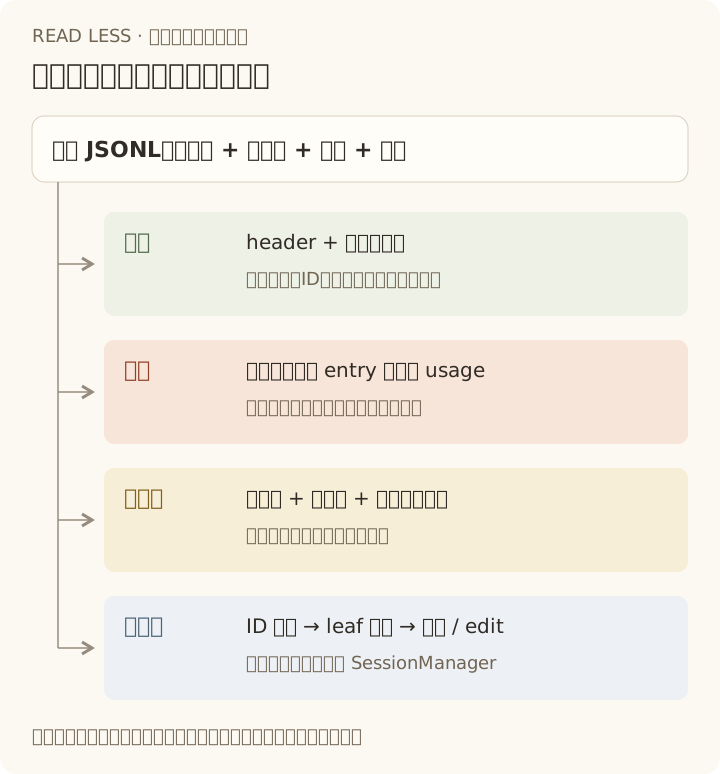
读一次不一定贵,重复读和常驻全文才容易出问题。 在下面的快照中,3.4 MB 全量解析约 2 ms;不应因此把它放进每次渲染。
开销实测
Node 24 / Apple Silicon,每项 30 次取中位数。文件体积会随会话继续增长,看量级和比例即可:
| 操作 | 数据量 | 耗时 |
|---|---|---|
| 只读 header + 末行(列表视图) | 3.5 MB 单文件 | 0.08 ms |
| 同上,20 个会话 | 8.6 MB 合计 | 1.3 ms |
split + 全量 JSON.parse | 3.4 MB / 285 行 | 2.1 ms |
| 同上 | 34 MB / 2,841 行 | 19.8 ms |
| 20 个会话全量解析 | 8.6 MB | 19 ms |
只正则抽取 usage(10 条共 2.2 MB 的行) | — | 0.20 ms |
同样 10 条行全量 JSON.parse | — | 0.88 ms |
内存才是主要成本。34 MB 的文件读成字符串约占 67 MB,解析成对象再占 43 MB,峰值约为文件体积的 3.2 倍。所以“能一次读完”不等于“应该常驻内存”。
小文件偶尔全读可以接受;大文件或频繁刷新改用流式 / 后台任务。统计累加后即可丢弃正文;时间线保留 role、时间、工具名、错误标记和短预览,完整输出按需取。表中的正则耗时仅作对照,不要用正则替代 JSON 解析器。
算法 1:列表视图只读首尾
会话 id 在 header,cwd 也在 header;列表里想显示的“最后活动时间”就在最后一行。中间几百 KB 到几 MB 完全不用读。下面几段代码共用一个类型定义:
// 会话文件不做 schema 校验,读取时只保证少数字段存在export type Json = Record<string, any>;export type Entry = Json & { type: string; id?: string; parentId?: string | null; timestamp?: string;};import { openSync, readSync, closeSync, statSync } from 'node:fs';
/** 只读文件头尾做会话列表:0.08 ms/文件,且不为工具输出占内存 */export function peekSessionFile(path: string) { const size = statSync(path).size; if (size === 0) throw new Error('会话文件为空'); const fd = openSync(path, 'r'); try { const head = Buffer.alloc(Math.min(size, 4096)); const headBytes = readSync(fd, head, 0, head.length, 0); const text = head.subarray(0, headBytes).toString('utf8'); if (!text.includes('\n') && headBytes < size) { throw new Error('header 未读完整,请改用流式读取'); } const header = JSON.parse(text.split('\n')[0]!) as Entry;
// 最后一条 entry 可能很大(实测 364 KB),窗口按需扩大 for (let window = 64 * 1024; ; window *= 4) { const bytes = Math.min(size, window); const tail = Buffer.alloc(bytes); readSync(fd, tail, 0, bytes, size - bytes); const lines = tail.toString('utf8').split('\n'); if (bytes < size) lines.shift(); // 丢掉窗口截断的半行 const last = lines.filter(Boolean).at(-1); if (last) { try { return { header, last: JSON.parse(last) as Entry, bytes: size }; } catch { if (bytes === size) throw new Error('最后一行不是合法 JSON'); } } if (bytes === size) throw new Error('没有可读取的完整条目'); } } finally { closeSync(fd); }}此示例用于已写完的文件快照;实时读取正在写入的文件,改用后面的增量 tail。两个窗口边界不能省:
- 尾部可能从一行中间开始,先丢掉窗口的首个残片。
- 末行可能大于 64 KB,按需扩大窗口;最坏仍会读完整个文件,不能把首尾读取当成严格
O(1)。
算法 2:单遍索引
需要的不止元数据时,对一份稳定快照顺序扫一遍、建好索引,不要为每条查询重新扫文件。
export interface SessionIndex {  header: Entry | null;  byId: Map<string, Entry>;  leafId: string | null;}
export function readSessionFile(raw: string): SessionIndex {  const byId = new Map<string, Entry>();  let header: Entry | null = null;  let leafId: string | null = null;
  for (const line of raw.split('\n')) {    if (line.length < 2) continue;               // 空行与末尾换行    const entry = JSON.parse(line) as Entry;    if (entry.type === 'session') { header = entry; continue; }    byId.set(entry.id!, entry);    leafId = entry.id!;                          // 追加写:最后一行就是 leaf  }  return { header, byId, leafId };}
leafId 取最后一行不是偷懒:Pi 加载会话时也是顺序扫描,将它覆盖成最后一条的 ID(_buildIndex())。/tree 单纯导航只改内存指针;生成分支摘要或提交消息才追加条目,文件里没有单独的“当前 leaf”记录。
算法 3:祖先链
有了 Map,从 leaf 上溯就是 O(路径长度),而不是每条消息重扫文件:
export function ancestorChain({ byId, leafId }: SessionIndex): Entry[] { const path: Entry[] = []; let current = leafId ? byId.get(leafId) : undefined; while (current) { // 每个 entry 只访问一次 path.push(current); current = current.parentId ? byId.get(current.parentId) : undefined; } return path.reverse();}反直觉但重要:链长度可能远小于条目总数(分支会话),也可能等于总数(线性会话)。本机 20 个会话都是线性的,所以两者相等——但别把这点写死,/tree 之后就会变。
算法 4:压缩边界
这是最容易写错的一段。只取最新 compaction,保留它之后的部分,并把保留区里的 system 消息丢掉:
export function contextEntries(session: SessionIndex): Entry[] {  const path = ancestorChain(session);  let compaction: Entry | undefined;  for (const entry of path) if (entry.type === 'compaction') compaction = entry;  if (!compaction) return path;
  const cut = path.indexOf(compaction);  const kept: Entry[] = [compaction];  let started = false;  for (let i = 0; i < cut; i++) {    const entry = path[i]!;    if (entry.id === compaction.firstKeptEntryId) started = true;    const isSystem = entry.type === 'message'      && (entry.message as { role?: string }).role === 'system';    if (started && !isSystem) kept.push(entry);  }  kept.push(...path.slice(cut + 1));  return kept;}
三个细节,写错就得到“看起来对但内容不对”的上下文:
- 只认最新的 compaction,不能把历史上所有压缩点都算上。
firstKeptEntryId之前的内容被摘要替代;如果它指向 compaction 自己,说明一条原文都不保留。- 保留区里的 system 消息要丢弃,否则压缩点之前的旧提示词会和
compaction.systemMessage打架。
算法 5:投影成消息
contextEntries() 给出的还是 entry,模型需要的是 message。这一步要补上 context_edit 覆盖和摘要消息结构(输入就是上一步的 contextEntries() 结果):
export function modelMessages(entries: Entry[]) {  const edits = new Map<string, Entry>();  for (const entry of entries) {    if (entry.type === 'context_edit') edits.set(entry.targetId as string, entry);  }
  const messages: Json[] = [];  entries.forEach((entry, index) => {    if (entry.type === 'compaction' && index > 0) return;   // 旧压缩点只占位    if (entry.type === 'usage' || entry.type === 'custom' || entry.type === 'context_edit') return;
    const edit = edits.get(entry.id!);    if (edit?.replacement === null) return;                  // 这条不进上下文
    if (entry.type === 'message') {      const message = entry.message as Json;      const original = message.content ?? (message.role === 'system' ? '' : []);      const replacement = edit?.replacement as { content: unknown } | undefined;      const value = replacement ? replacement.content : original;      const content = replacement && typeof value === 'string'        && (message.role === 'assistant' || message.role === 'toolResult')        ? [{ type: 'text', text: value }]                    // 这两种 role 必须用 block 数组        : value;      messages.push({ ...message, content });    } else if (entry.type === 'compaction') {      if (entry.systemMessage) messages.push(entry.systemMessage as Json);      messages.push({        role: 'compactionSummary', summary: entry.summary,        tokensBefore: entry.tokensBefore, timestamp: Date.parse(entry.timestamp!),      });    } else if (entry.type === 'branch_summary' && entry.summary) {      messages.push({ role: 'branchSummary', summary: entry.summary, fromId: entry.fromId, timestamp: Date.parse(entry.timestamp!) });    } else if (entry.type === 'custom_message') {      const replacement = edit?.replacement as { content: unknown } | undefined;      messages.push({        role: 'custom', customType: entry.customType,        content: replacement ? replacement.content : entry.content ?? [],        display: entry.display, details: entry.details, timestamp: Date.parse(entry.timestamp!),      });    }  });  return messages;}
edits 要先扫一遍再应用,因为 edit 排在目标 entry 之后:边遍历边覆盖会漏掉先出现的消息。多条 edit 指向同一条时,Map 天然保留最后一条,正好符合 Pi 的语义。
还有一个容易写错的细节:context_edit.replacement.content 是字符串时,只有 assistant 和 toolResult 需要包成 [{ type: 'text', text }],其它 role 直接用字符串。写反了不会报错,只会让下一轮请求里的消息形状与 Pi 不一致。
算法 6:用量与缓存命中率
页脚要实现同样的口径:扫全文件(不是当前分支),并且 CH 只看最后一条 assistant:
type Usage = { input?: number; output?: number; cacheRead?: number; cacheWrite?: number; cost?: { total?: number } };
export function usageTotals(session: SessionIndex) {  const totals = { input: 0, output: 0, cacheRead: 0, cacheWrite: 0, cost: 0 };  let cacheHitRate: number | undefined;
  for (const entry of session.byId.values()) {   // 整个文件,含所有分支    const message = entry.type === 'message' ? entry.message as Json : undefined;    let usage: Usage | undefined;    if (entry.type === 'usage' || entry.type === 'compaction' || entry.type === 'branch_summary') {      usage = entry.usage as Usage | undefined;    } else if (message?.role === 'assistant' || message?.role === 'toolResult') {      usage = message.usage as Usage | undefined;    }
    // 即使最后一条 assistant 没有可用 usage,也不能沿用前一次的 CH    if (message?.role === 'assistant') {      const prompt = (usage?.input ?? 0) + (usage?.cacheRead ?? 0) + (usage?.cacheWrite ?? 0);      cacheHitRate = prompt > 0 ? ((usage?.cacheRead ?? 0) / prompt) * 100 : undefined;    }    if (!usage) continue;    totals.input += usage.input ?? 0;    totals.output += usage.output ?? 0;    totals.cacheRead += usage.cacheRead ?? 0;    totals.cacheWrite += usage.cacheWrite ?? 0;    totals.cost += usage.cost?.total ?? 0;  }  return { ...totals, cacheHitRate };}
这里同时处理 usage entry(如缓存预热)、compaction.usage 和 branch_summary.usage;只累加 assistant 消息会漏账。custom、label 不贡献用量。此函数只返回数值,字段是否显示、单位取整与订阅标记仍由 UI 决定。
算法 7:增量 tail
正常追加时,记住字节偏移,只解析以换行提交的完整记录。需要保留两种残片:未解码完的 UTF-8 字节和尚未换行的 JSON 文本。
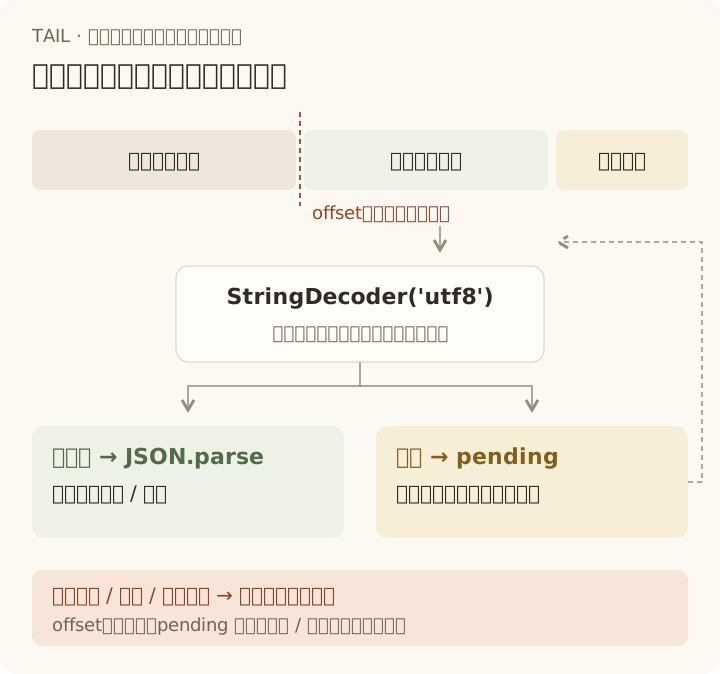
以下示例复用前面的 openSync、readSync、closeSync 导入:
import { fstatSync } from 'node:fs';import { StringDecoder } from 'node:string_decoder';
export class SessionTail {  private offset = 0;  private pending = '';  private decoder = new StringDecoder('utf8');  private identity: string | undefined;
  constructor(private readonly path: string) {}
  read(): Entry[] {    const fd = openSync(this.path, 'r');    try {      const { size, dev, ino } = fstatSync(fd);      const identity = `${dev}:${ino}`;      if (size < this.offset || (this.identity !== undefined && this.identity !== identity)) {        throw new Error('会话文件已缩短或替换,请重建读取器及上层索引 / 统计');      }      this.identity = identity;      if (size === this.offset) return [];                   // 没有新增字节,不解析
      const buf = Buffer.alloc(Math.min(size - this.offset, 64 * 1024));      const bytesRead = readSync(fd, buf, 0, buf.length, this.offset);      this.offset += bytesRead;                             // 按实际读取量推进,下次继续      const text = this.decoder.write(buf.subarray(0, bytesRead));      const lines = (this.pending + text).split('\n');      this.pending = lines.pop() ?? '';                     // 不完整行留到下次      return lines.filter((line) => line.trim()).map((line) => JSON.parse(line) as Entry);    } finally {      closeSync(fd);    }  }}
每次最多读 64 KB;调用方继续读取,直到追上文件大小。完整行解析失败会直接抛错,不会静默跳过。检测到缩短或替换时,同样交给调用方重建,不能只清空 offset 而保留旧统计。
同一 inode 上的同尺寸或增长重写,不能只凭 size 识别。监听器得知迁移、覆盖等重写事件时,应主动丢弃这个读取器及其缓存。该示例面向单个 Pi 写入者的正常追加,不承诺任意并发改写下的一致快照。
什么时候不要自己写
只要你要的是“Pi 认知里的上下文”,直接用官方实现,别赌自己的裁剪逻辑:
import { SessionManager, buildSessionContext } from "@earendil-works/pi-coding-agent";
const manager = SessionManager.open(sessionFile);const { messages, model, thinkingLevel } = buildSessionContext( manager.getEntries(), // 全部 entry(浅拷贝) manager.getLeafId(),);| 需求 | 用什么 |
|---|---|
| 已加载会话的上下文、分支、压缩 | SessionManager + buildSessionContext() |
| 只要当前分支的 entry | manager.buildContextEntries() |
| 只要条目数量(避免拷贝) | manager.getEntryCount() |
| 自己扫文件(列表、统计、导出) | 本页的算法 |
getEntries() 每次返回浅拷贝,在循环里反复调用会产生 O(n²) 的复制开销;需要多次遍历时先取一次存变量。
正确性校验
自己写投影,就必须有 oracle。做法是拿官方实现当基准,逐个会话比对:
import { readFileSync } from "node:fs";import { SessionManager } from "@earendil-works/pi-coding-agent";
const manager = SessionManager.open(sessionFile);const ref = manager.buildSessionContext().messages;          // 官方答案const mine = modelMessages(contextEntries(readSessionFile(readFileSync(sessionFile, "utf8"))));const same = JSON.stringify(mine) === JSON.stringify(ref);
原始采样中的 20 个线性会话曾得到 20/20 一致结果;这是历史样本结果,不是所有边界或后续修改的正确性保证。自己接入时还应覆盖分支、压缩、重复 edit、custom_message 与旧版本迁移。
不要只比条数和 role:compactionSummary 把 summary 写成 content,两者都可能相同,但消息字段已经不一致。上面的 SessionManager.open() 在遇到旧格式时可能迁移并重写文件;做只读分析应先复制文件,避免把原始证据改掉。
复杂度与失效条件
设文件字节数为 B、条目数为 n、当前路径长度为 p、最长行为 L:
| 层 | 首次读取 / 查询成本 | 主要常驻数据 | 失效条件 |
|---|---|---|---|
| 列表 | header + 末行长度;最坏 O(B) | 少量元数据 | 文件身份、大小或修改时间变化 |
| 统计 | 解析 O(B),聚合 O(n) | 累计数;流式读取仍需容纳单行 O(L) | 追加增量合并;重写则清空重算 |
| 时间线 | 解析 O(B) | O(n) 元数据,不保留完整正文 | 追加合并;重写重建 |
| 上下文 | 首次建索引 O(B);已有索引后回溯 / 投影 O(p) | 路径与正文;本页 Map 示例保留全文件 | leaf、压缩、edit 或文件变化 |
不能把上下文更新一概当成“追加一条消息”。 新压缩点或 edit 会改变旧消息的贡献。
Pi 的页脚缓存还比较 session 对象、sessionId、leafId、entryCount 和实际窗口对应的模型;条件不变时复用统计。自己的 UI 也应把缓存失效与渲染分开,而不是在每一帧重新扫文件。
五个容易踩的坑
- 在渲染或请求路径里全量重算。 2 ms 看着便宜,每秒几十帧就是另一个故事。缓存 + 失效条件。
O(n²)遍历。 对每条消息调用一次getBranch()、或在循环里反复getEntries(),都会退化成平方级。- 把 leaf 当成“没有子节点的那条”。 恢复会话时 leaf 是文件最后一行;分支后两者会分叉。
- 只读第一条 system 消息。 提示词是增量 patch,顺序回放才得到当时的真实内容。
- 忘记半行与大行。 尾部窗口截断、写盘中途读取、364 KB 的单行,都会让“看起来正常”的解析器偶发失败。
相关
- 字段含义与真实样例:会话文件解剖。
- 这些数字在界面上的位置:状态栏与 statusline。
- 在应用里长期持有会话:SDK 与 Vue 最小集成。